Virtual Private Network
A Virtual Private Network (VPN) is an overlay network on the Internet that allows you to communicate with other hosts on the VPN as though they were on a Local Area Network (LAN). The VPN software transparently encrypts and transmits packets intended for VPN hosts to their actual remote IPs on the Internet.
We are using WireGuard. It is simpler and much easier to set up than OpenVPN. A VPN connection is made simply by exchanging very simple public keys — exactly like exchanging SSH keys — and all the rest is transparently handled by WireGuard.
All communication and services internal to our collective will be available on the VPN. This improves security by preventing access to these services from the broader Internet. As such, connecting to this VPN will be a prerequisite for most of our services.
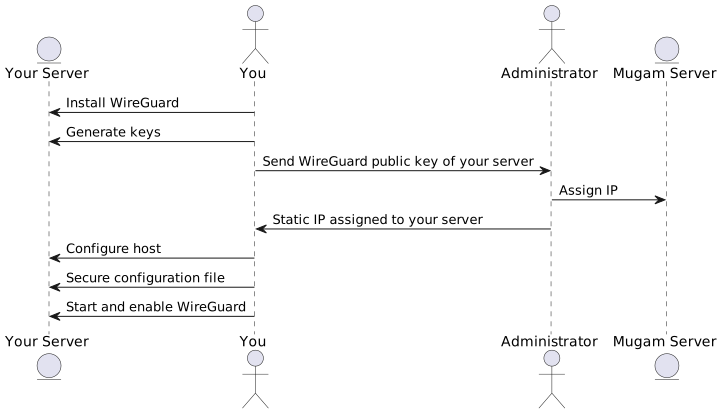
Installation
Install the relevant wireguard packages for your distro as described in the WireGuard installation manual.
Required information
Send to the server administrator
- The WireGuard public key of your host
Receive from the server administrator
- The static VPN IP address assigned to your host
Generate your public/private keys
Generate your private key.
$ wg genkey > privatekey
Derive your public key from your private key.
$ wg pubkey < privatekey
Configure your host
The configuration file should be at
/etc/wireguard/INTERFACE.conf. You can call the VPN interface
anything you want. But, for the purposes of this manual, we shall call
the interface wg0. Therefore, we put the configuration file at
/etc/wireguard/wg0.conf.
The WireGuard configuration file format is based on the INI file format. The first section of the configuration file — the Interface section — describes your own host. The subsequent sections — Peer sections — describe other hosts on the network.
Interface section
[Interface]
PrivateKey = your-private-key-here
ListenPort = 51820
Address = your.virtual.ip.address/24
If your host does not have a public Internet IP and is on a NATed connection to the Internet, the ListenPort field is meaningless. You can remove it. Else, open port 51820 on your firewall to receive incoming connections.
Peer sections
In principle, WireGuard is a P2P network. There is no need for data to flow through a central server. Data can flow directly from one host to any other host. But, for now, to keep things simple, we will set it up in the star topology with a central server. So, for now, we will have only one "peer" — the server.
[Peer]
PublicKey = public-key-of-server-here
Endpoint = 188.166.169.68:51820
AllowedIPs = 192.168.2.0/24
PersistentKeepAlive = 25
You may find the public key of the server at ./static/wireguard-server-public-key.gpg.
$ gpg -d wireguard-server-public-key.gpg
Secure your WireGuard config
Your WireGuard config at /etc/wireguard/wg0.conf contains your
WireGuard private key. Therefore, secure it with appropriate file
system permissions. The recommended permissions are shown below.
# chown root:root /etc/wireguard/wg0.conf
# chmod 600 /etc/wireguard/wg0.conf
Start WireGuard
# wg-quick up wg0
Set up WireGuard to start on boot. Depending on your distro, and whether you use systemd, this might be:
# systemctl enable wg-quick@wg0.service
Troubleshooting
Check if the wireguard kernel module is loaded
$ lsmod | grep wireguard
Check if the wireguard module is loaded in the kernel. If it is not, you have missed some step in the installation process.